Drop I-frames, duplicate P-frames,
build glitch sequences. Free & open source.
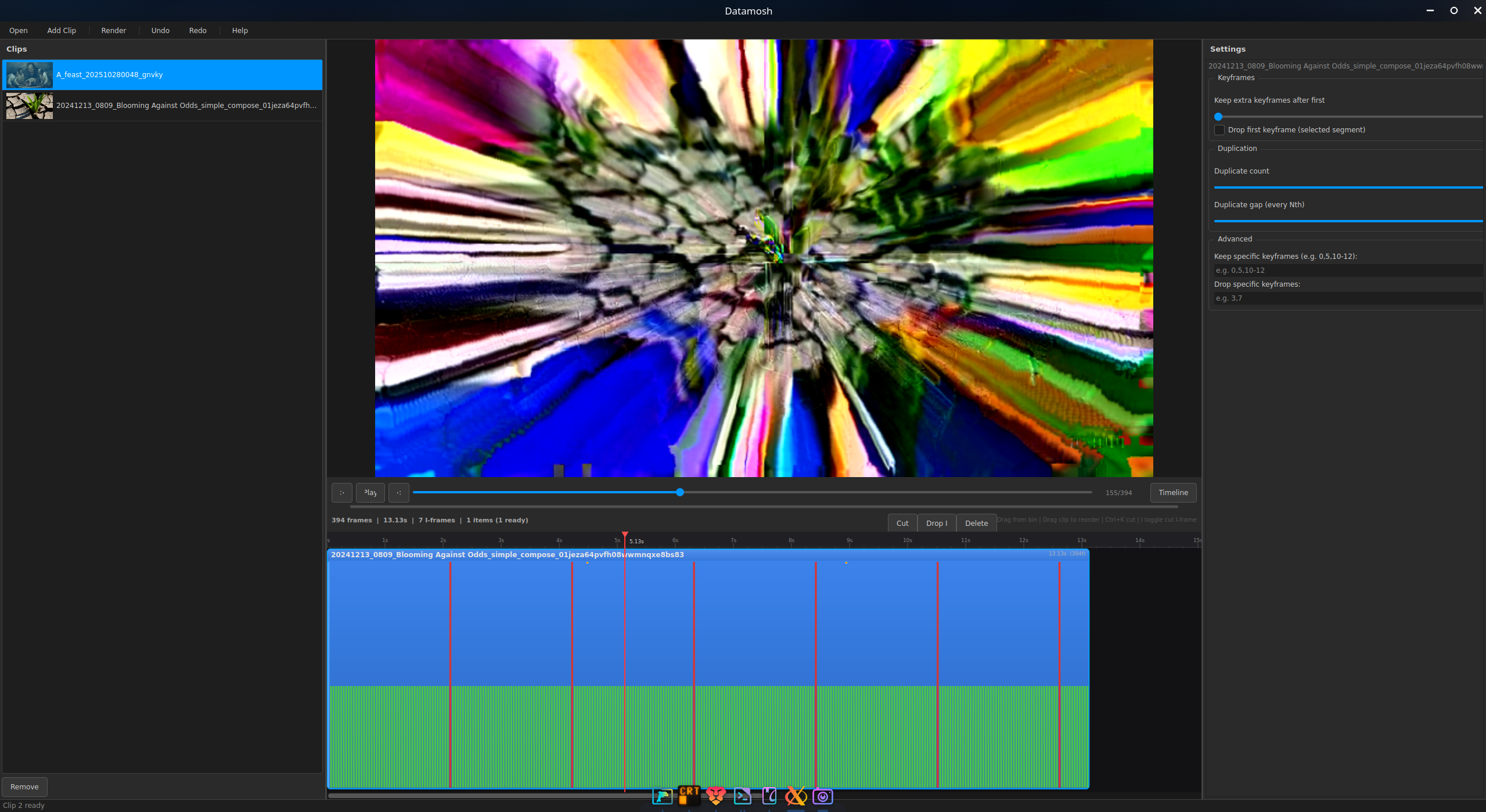
Premiere-style timeline with zoom, scrub, and per-clip control. Drag to reorder, visualize frame density.
See glitches in real time. Parameter changes trigger a debounced re-mosh with instant frame display.
Operates directly on RIFF/AVI binary structure. No decoding, no re-encoding. Pure chunk-level manipulation.
Import MP4, MOV, MKV, WebM (auto-normalized to Xvid). Export the mosh as native AVI, or re-encoded MP4/MOV for easy sharing.
Tune keep/duplicate/gap/keyframe-drop per timeline segment — the same clip can appear twice, moshed differently. Save sessions as .dmosh projects.
Insert custom I-frames between clips to control where motion vectors propagate. Seed corruption precisely.
Drop any video file. It's normalized to Xvid AVI automatically.
Set parameters per clip: frames to keep, P-frames to duplicate, gap, keyframe dropping.
Watch the glitch evolve in real time. Binary rewrite + frame extraction in milliseconds.
Export as AVI, MP4, or MOV — multiple clips with different settings in one output. Save the session as a .dmosh project to reopen later.